Retro Halloween Digital Paper Pattern: A Spooky Season Staple for Creative Projects
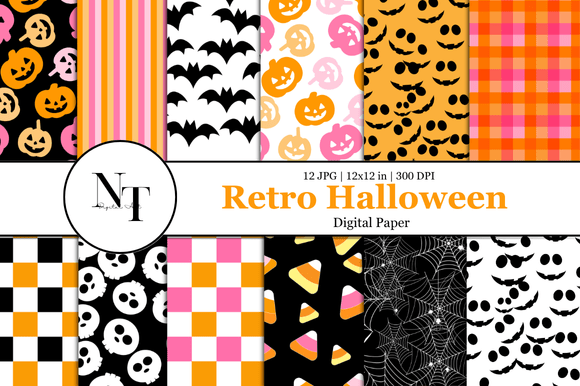
Halloween is a time for creativity, and the Retro Halloween Digital Paper Pattern brings that spirit to life with its nostalgic charm and versatile design options. Whether you're planning a themed party, creating handmade cards, or working on a scrapbooking project, this digital paper pack offers everything you need to elevate your craft game. With 12 high-quality 12x12 inch JPG designs at 300 DPI, it's an instant digital download perfect for both beginners and seasoned creators.
What Is Retro Halloween Digital Paper Pattern?
The Retro Halloween Digital Paper Pattern is a collection of festive, vintage-inspired designs ideal for a variety of crafting needs. These papers are digitally formatted, making them easy to use in print or online. The set includes smiling pumpkins in shades of orange, pink, and cream; flying black bats on white backgrounds; cute white skulls on black; candy corn motifs; detailed spider webs; and checkerboard and stripe patterns in pastel pink, orange, and black. Each pattern is crafted to evoke the cozy, spooky vibe of classic Halloween aesthetics while maintaining modern usability.
Why This Pack Appeals to a Wide Audience
This Halloween digital paper pack is more than just a fun tool for crafting—it’s a resource that can help professionals, hobbyists, educators, and entrepreneurs alike create compelling visuals for their projects. Bloggers can use these patterns as backgrounds for seasonal posts. Marketers might incorporate them into promotional materials for events or products. Educators could utilize them for classroom decorations or themed learning activities. For small business owners, these designs offer a way to create unique packaging or branded stationery without investing in custom artwork.
Common Mistakes When Choosing Halloween Digital Papers
When selecting digital paper for creative projects, many users overlook key factors that impact the final outcome. Here are some common pitfalls and how to avoid them:
- Ignoring Resolution Requirements: Not all digital papers are created equal when it comes to print quality. Using low-resolution images (such as those below 300 DPI) can lead to blurry prints. Always confirm the file resolution before downloading—this pack ensures crisp, clear output at 300 DPI.
- Misjudging File Format Compatibility: Some software may not support certain image formats properly. The Retro Halloween Digital Paper Pattern provides JPG files, which are widely compatible with most design programs and printers. If you're using PDF-based tools, ensure they accept layered or embedded JPGs.
- Not Checking Dimensions for Use: While 12x12 inches is standard for scrapbooking and cardmaking, other uses like sublimation printing or digital backgrounds may require different sizing. Before purchasing, consider where you'll apply the papers and if any resizing will be necessary. This pack offers flexibility due to its high resolution and standard dimensions.
- Overlooking Color Accuracy: Digital displays can vary in color calibration, so what looks vibrant on one screen might appear dull on another. When using these papers for print, always preview them on a calibrated monitor or consult a professional printer for accurate color matching.
How to Maximize Your Use of the Retro Halloween Digital Paper Pattern
To get the most out of your Halloween crafting, follow these practical tips:
- Organize Your Files: After downloading the pack, sort the files by category or theme. Create folders for “Pumpkins,” “Bats,” “Skulls,” etc., to streamline your workflow and reduce confusion during your project creation phase.
- Use Layering Techniques: Don’t limit yourself to just one design per page. Experiment with layering two or more papers subtly to add depth and interest to your layouts. For example, place a bat-themed background under a skull design for a dramatic effect.
- Test Print Samples: Before committing to a large print run for invitations or decorations, print a small test sample to check colors, contrast, and overall appearance. This helps prevent costly reprints and ensures your final product looks as intended.
- Optimize for Digital Use: If you're using these papers as digital backgrounds for websites or social media, scale them appropriately to fit your platform’s requirements. Ensure they don't pixelate when resized and maintain a clean look across devices.
Realistic Examples of How to Apply These Patterns
Let’s say you’re hosting a Halloween-themed baby shower. Instead of buying pre-printed invitations, you can design your own using one of the Retro Halloween Digital Paper Patterns as a base. Pair the smiling pumpkin design with soft fonts and gold accents for a warm, inviting feel. Another example: a blogger preparing a fall decor guide could use the spider web pattern as a subtle background behind text blocks, enhancing visual appeal without distracting from the content.
If you're into junk journaling, these papers can serve as cover art or inner pages. Try combining the pastel stripes with the candy corn design for a playful yet elegant look. Sublimation artists can also benefit—using the skull pattern on mugs or apparel adds a personalized touch that stands out.
What to Consider Before Making a Purchase
Before buying the Retro Halloween Digital Paper Pattern, take a moment to assess your needs and the features of the product. Ask yourself:
- Will I be printing these papers, or using them digitally?
- Do I have access to a printer capable of handling high-resolution JPGs?
- Am I familiar with the software required to edit and use these files effectively?
- Do I need additional Halloween-themed elements beyond just the paper designs?
By answering these questions, you’ll ensure that the pack aligns with your crafting goals and avoids unnecessary frustration later on.
Avoiding Overlooked Details in Design Application
One often-overlooked detail is the importance of white space. Even though these Halloween papers are busy and full of details, overloading your project with too many elements can make it visually overwhelming. Use the papers as a foundation, then build around them with minimal but meaningful embellishments.
Another issue arises when people forget to adjust the opacity of layers. If you're adding multiple Halloween papers together, try reducing the opacity slightly to blend the designs seamlessly. This creates a cohesive look rather than competing visuals.
Comparing Retro Halloween Papers with Other Options
While there are countless Halloween-themed digital papers available online, the Retro Halloween Digital Paper Pattern distinguishes itself through its attention to detail and balanced color palettes. Many generic packs rely heavily on neon tones or overly dark themes, which can limit their usability. This set, however, blends traditional Halloween symbols with softer, pastel hues, offering a wider range of applications—especially for those who want to avoid a gaudy aesthetic.
Additionally, the inclusion of both light and dark backgrounds allows for greater versatility. You won’t be stuck choosing only one style; instead, you can match each paper to the specific tone or mood of your project.
Ensuring Quality and Efficiency in Your Crafting Workflow
High-quality digital papers can significantly enhance the professionalism of your work. The Retro Halloween Digital Paper Pattern ensures that every design is sharp and ready to use right out of the box. However, even with great materials, poor organization or technique can affect your results. To stay efficient:
- Keep a backup copy of the downloaded files.
- Use consistent naming conventions for easier retrieval.
- Plan your layout before applying the papers—this saves time and reduces trial-and-error.
- Consider using a digital ruler or grid in your design software to align elements neatly.
Final Thoughts on Choosing the Right Halloween Paper Pack
In the world of digital crafting, having the right tools makes all the difference. The Retro Halloween Digital Paper Pattern is a valuable addition to any creator's toolkit, especially when used thoughtfully and with awareness of potential missteps. By avoiding common errors and following best practices, you can unlock the full potential of these designs and bring your Halloween projects to life with flair and finesse.